


|
Introduction
It came topical for me to update either the CPU or video card. There isn't enough money for both, so which to choose? I decided to try the latter option and bought Gainward's Ti4200 Ultra/650 DVI/Tv -card. The purpose of this review/article is to see, how an older computer works with a newer card and what will become the slowing part after this.
Package
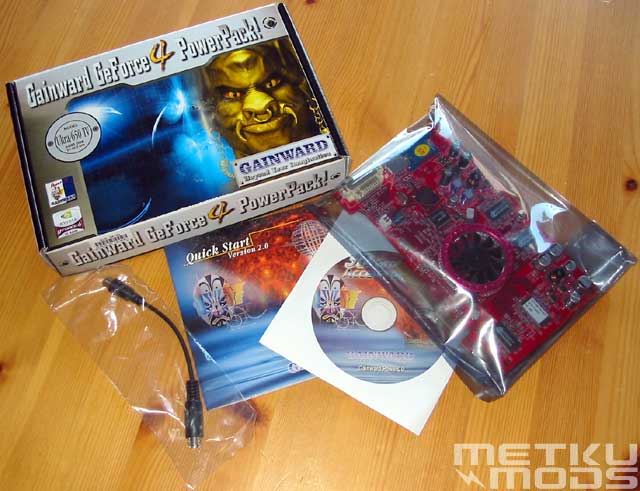
The package included the Ti4200-card with 64 megabytes of memory and equipped with DVI- and SVHS-connectors. There was also a thinnish manual, which tells how to install the card and software, also manuals and drivers on the CD and the cable for the SVHS-connector, which is used to convert the connector to composite-out. There weren't any games or other extra software from other manufacturers included. There wasn't either the DVI-I-adapter, so if you want to use two monitors you are required to buy one. Altogether sparse, but adequate.
The Card
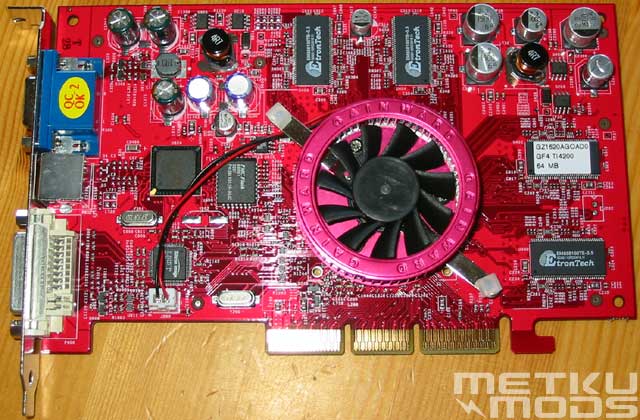
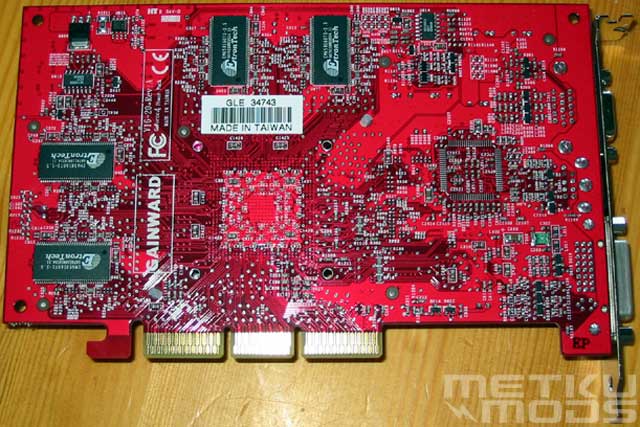
The card doesn't differ that much from the NVidia's reference card. The color is, however, refreshingly red. The most suprising thing is the cooling used on the card. Compared to other GF4-cards it differs pretty much of its construction. Gainward has decided to use ORB-style heat sink and fan, which isn't so effective, although this time it's quiet. Other GF4-cards have a heat sink that directs the air flow coming from the fan towards the memory chips. Gainward's solution spreads the air flow around the card and does not focus it, which isn't very effective. The cooling is although sufficient when using regular clocks, but while overclocking, the supplied cooling must be replaced with something more efficient.
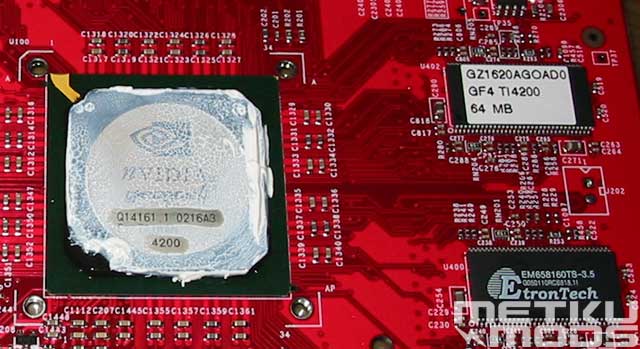
The graphics processor itself is newer A3-revision. The newer revisions include improvements and fixes to the older revisions and in this way enable also better overclocking. As memory there are eight DDR-chips of 8 megabytes. The manufacturer is EtronTech and the chips have operating speed of 3.5 ns. This enables the theoretical speed of 571 MHz, which is good for the possible overclocking, because the Ti4200 is usually specified to work at 500 MHz's memory speed. You can check the speed of your memory chips with Metku's speed calculator.
After installing the card it was noticed that the memory speed is 513 MHz. The card is, however, not a golden sample, so it's surprising that the card has such fast memory and they are clocked over the default speed than in other Ti4200-cards.
Benchmark
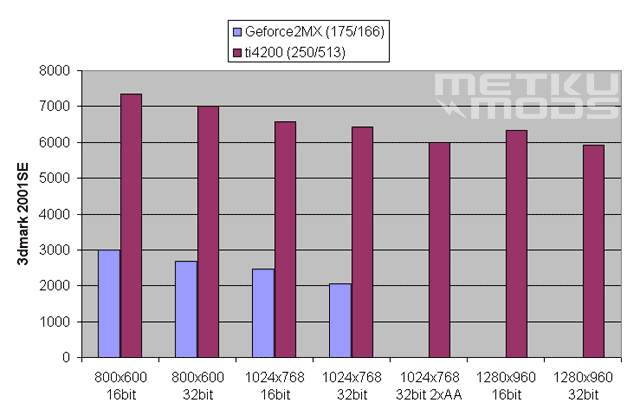
The purpose was to see, how this kind of new video card works with the older CPU. There were two test computers, old but still sufficient for many games and programs. The previous video cards in both computers were geforce 2MX, so the comparision were made against these.
1st computer:
| CPU | AMD duron 600 @ 1036MHz (109x9.5) |
| Motherboard | Abit KT7 |
| Memory | 768 megabytes PC133 Spectec |
| OS | Microsoft Windows XP Professional |
2nd computer:
| CPU | AMD duron 1200MHz (100*12) |
| Motherboard | ECS K7VZA |
| Memory | 512 megabytes PC133 Spectec |
| OS | Microsoft Windows 2000 Professional |
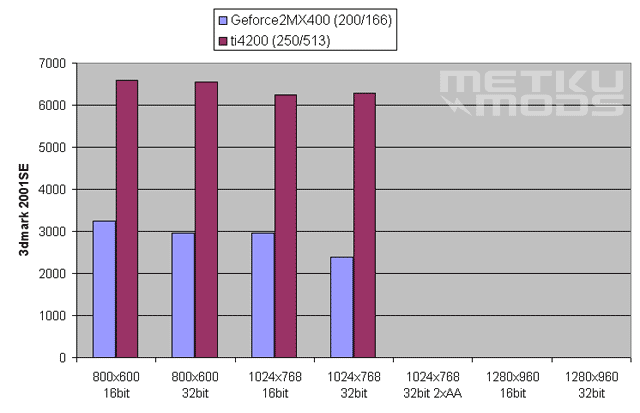
The results tell what many of you might already have quessed. The processor can't use the full potential of the video card. 1st computer was a bit faster with the new card. This might be linked with the higher front side bus speed.
The image quality and anti-aliasing
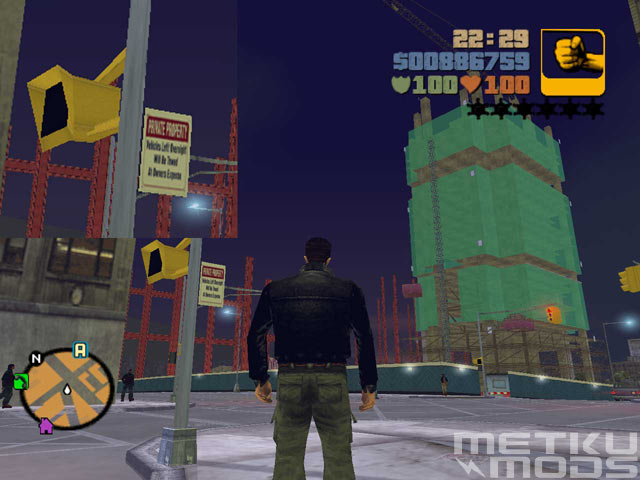
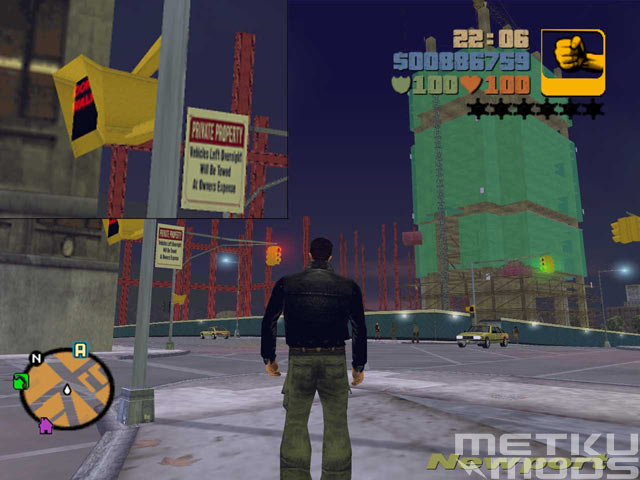
These images have been taken in game with the resolution of 1280x960 and 32-bit colors. The lower picture has a 4x anti-aliasing and the upper picture is without anti-aliasing. From the magnification placed in the left side of the images one can well notice how the anti-aliasing removes the jagged edges from tilted surfaces. The calculation of the anti-aliasing takes quite a lot of power, which causes slower frame rates. Ti4200 still performs the anti-aliasing quite fast. As seen in the test, 1024x768-resolution with 32-bit colors and 2xAA was twice as fast as 800x600 with 16-bit colors with the old GF2MX. Many of the players won't notice the anti-aliasing while playing, but it can still be activated knowing that the performance of the card won't be affected that much.
Conclusion
Test results show well, how the newer generation video card needs
also a newer generation processor to work with. This doesn't mean, that one
shouldn't purchase for e.g. this kind of Geforce4 video card in one's older
computer. There was a distinct difference between these cards and the performance
of the newer card was not affected that much by the change of the resolution.
Would there have been a similar effect if one would have changed the processor
only? Probably not. This time one was concentrating on the gaming speed, which
requires more from the video card. There would have been better performance
in general calculating, which is needed in image processing, modelling and programming
etc. This would have brought more power to the old MX, but not as much as replacing
the old card with a new one.
How about the overclocking? My old GF2MX was capable of 205/205 (core/memory)
speed and this brought some more power, but if one has planned to purchase newer
hardware for playing, Ti4200 is the way to seriously consider. When it's time
to update the motherboard and processor, one knows that the performance of this
card will scale with the processor speed. There are lots of tests with Ti4200
and faster processors on the Internet and one can see for oneself how the card
would perform with other updated hardware.
Pros and Cons
+ Powerfull
also in old computer
+ Fast memory
+ Good quality TV-out-image
+ Price
- Non-existent extras in the package
- Lack of the DVI-I-adapter
- Cooling
Additional information
|
|

 Content in english!
 Sisältö suomeksi!